


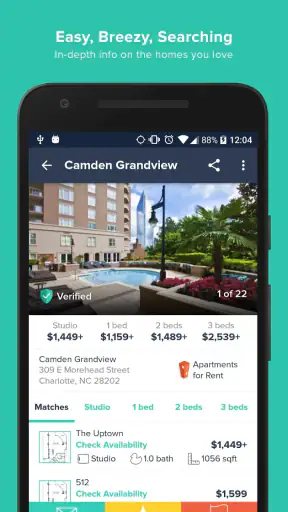
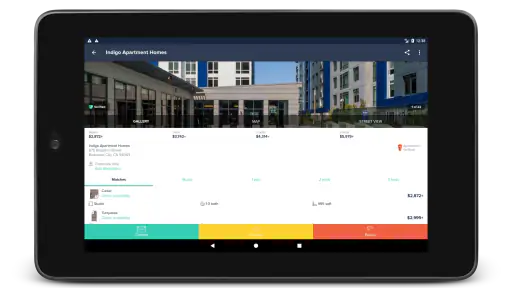
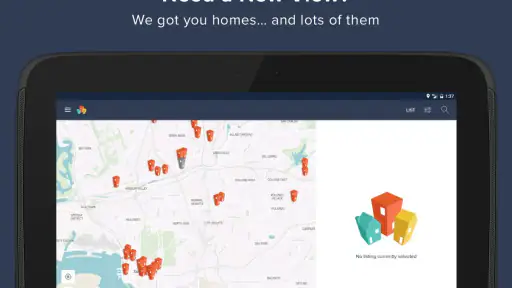
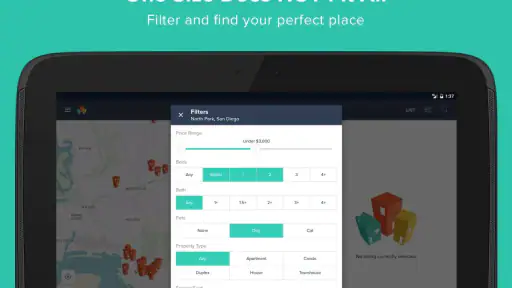
Finding a rental can become a part-time job: open a listing, check the map, compare the commute, save the promising options, then repeat the whole process when a place disappears. I found HotPads Rent Apartments most useful when I treated it as a map-first search tool rather than a complete replacement for every rental website. It helps me understand where homes sit in relation to streets and neighborhoods, which is often more useful than scrolling through a long list.
This free House & Home app is made by HotPads, owned by ZillowGroup, and is aimed at people searching for apartments and homes for rent. It is rated for Everyone, runs on Android ten or later, and the current version is 7.1.3. Its scale is reassuring: more than a million installs, about a 4.6 average from roughly forty-five thousand ratings, and around thirteen thousand written reviews. Those figures do not guarantee that every listing will suit me, but they do suggest that the app has become a familiar starting point for renters.
Getting past the first points of friction
The first useful habit is to decide what I am actually searching for before touching the map. If I only know that I want “something affordable,” the screen can quickly become overwhelming. I get better results by choosing a general area, deciding whether I need an apartment or a house, and identifying the one requirement I will not compromise on. That might be a short commute, a particular neighborhood, or enough space for a home office.
Map-based searching is powerful, but it can also make me chase attractive pins that are not realistic for my daily routine. A listing may look close to a preferred district while sitting across a major road, far from the transit stop I would use, or outside the part of town where I actually want to live. I use the map to narrow the field, then inspect each candidate as a separate decision instead of assuming that visual closeness equals convenience.
One common sticking point is expecting the map to answer questions it cannot answer by itself. A pin can show where a home is located, but it does not replace checking the listing details, contacting the relevant party, or confirming whether the home still matches my needs. I see HotPads as a discovery and comparison layer. The final decision still requires ordinary rental due diligence.
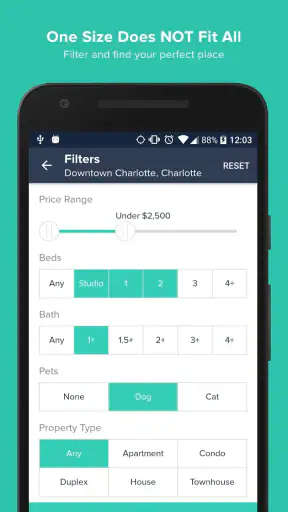
Another source of frustration is an apparently empty search. Before blaming the app, I loosen one condition at a time. I might widen the area slightly, adjust the price range, or reconsider whether a specific home type is essential. Changing everything at once makes it impossible to know what removed the results. Small, controlled changes are faster and give me a clearer picture of the local rental supply.
Setup checks that make the map more useful
I start by checking the basics: the app is installed from the intended store, the device meets the Android minimum of version ten, and the connection is stable enough to load maps and listing information. If the map appears blank or results stop loading, I first switch between a reliable Wi-Fi connection and mobile data, then reopen the search. This simple check often separates a temporary connection problem from an issue with the search itself.
I also avoid judging the app from one unusually narrow search. A small radius and several strict requirements can produce very few homes even when the service is working normally. I begin with a broader search to confirm that results appear, then narrow the area or requirements gradually. This is a practical way to test the setup without randomly changing every option.
Location-based searching deserves a little thought. If I am looking for a future move rather than a home near my current position, I make sure the map is centered on the destination area instead of assuming the app will understand my plans. Searching around a workplace, campus, family member, or preferred neighborhood gives me a more useful starting point than searching from wherever I happen to be standing.
I keep the app updated when an update is available, especially because the current release is 7.1.3. I do not treat an update as a cure for every problem, but running a current version is a sensible first step before spending time troubleshooting. If the app behaves oddly after an update, fully closing and reopening it is a harmless recovery step before trying anything more disruptive.
There is also a practical screen-management issue. On a phone, I can lose track of which map position produced a promising result, particularly after moving around several neighborhoods. I make a short note of the street or area as I compare homes. That small habit prevents me from reopening the same listings repeatedly and helps me compare locations based on my actual priorities rather than on whichever card I viewed most recently.
A recovery workflow when searching goes wrong
When results stop responding, I use a simple sequence. First, I return to a broader area and check whether any listings load. Next, I close and reopen the app. If the problem remains, I verify the connection and restart the device. I make only one change at a time so I can tell whether the issue came from the network, the search settings, or the app session.
If one search seems stuck while another works, I rebuild the search instead of repeatedly tapping the same controls. I clear the most restrictive choice, move the map slightly, and wait for the new area to load. This is especially helpful when I have been panning across several neighborhoods and the screen no longer reflects the area I think I am viewing.
When a listing that interested me is no longer visible, I do not immediately assume it was deleted or that the app lost it. Rental availability changes quickly, and map position or filters may have changed during browsing. I retrace the neighborhood, broaden the search, and compare nearby results. If the home remains important, I use the details I already recorded to investigate it through the appropriate rental contact rather than relying on memory.
My most useful workflow is to divide searching into three passes. In the first pass, I explore the map and collect possibilities without overanalyzing every photo. In the second, I remove homes that fail an obvious requirement, such as location or size. In the third, I inspect the remaining candidates carefully and prepare questions. This prevents the app from turning a quick search into an endless stream of individual decisions.
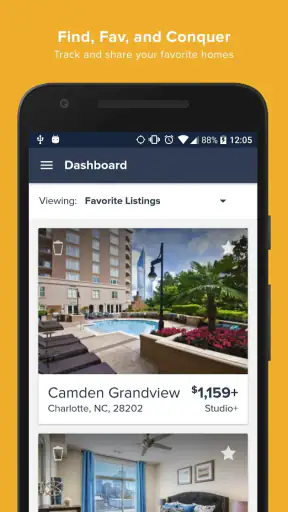
I also separate “interesting” from “ready to contact.” A map pin can be worth remembering even when I have not yet checked whether the location works. Conversely, a home that looks excellent may be unsuitable once I consider the route, surrounding streets, or the information in its listing. Keeping those stages separate makes the search calmer and reduces impulsive decisions.
What HotPads does well in everyday rental hunting
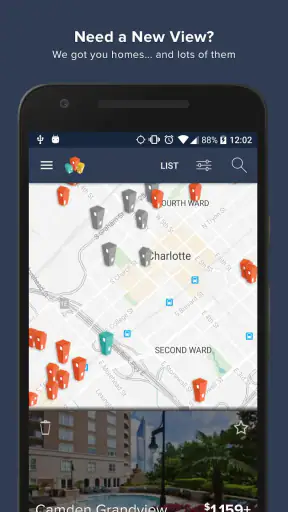
The strongest part of the experience is the map itself. When I move to a new city or unfamiliar neighborhood, a list alone does not tell me enough. The map helps me see clusters of rentals, gaps between areas, and how close options are to the places that matter in my routine. I can compare a home near a busy central district with another farther out without losing the geographic context.
A realistic example is a weekday search after work. I might need a rental that keeps a morning commute manageable, but I may not know the neighborhoods well enough to search by name. I can open the map around the workplace, scan outward, and identify areas that deserve closer attention. Then I can compare individual homes rather than contacting every listing in the city. That is where the app saves effort: it turns an unfamiliar area into a visual shortlist.
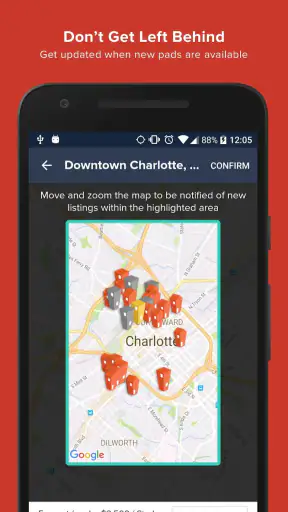
It is also useful for renters who are flexible about the exact neighborhood but not about the broader location. Instead of committing too early to one district, I can watch how availability changes as I move around the map. This may reveal nearby areas I had overlooked. The trade-off is that flexibility can become distraction, so I set a boundary before exploring too widely.
Another non-obvious benefit is using the map to test assumptions. I may think one neighborhood has the best selection, only to discover that a nearby area offers more possibilities within the same general travel zone. That does not prove the nearby area is better, but it gives me a reason to compare it. I find this more informative than repeatedly refreshing a single neighborhood.
The app’s free price makes it easy to add to a rental-search routine without creating another subscription decision. Its Everyone age rating also makes it broadly accessible for ordinary household searches. I would still be careful about sharing personal information or making commitments during the process, because a simple search tool does not remove the need to evaluate each rental interaction responsibly.
Where another approach may be better
HotPads is not the right sole tool for every renter. Someone who already knows the exact building they want may prefer going directly to that property’s official contact channel. A person searching in a very small market may also need several local sources because one app cannot guarantee complete coverage of every available home.
I would also avoid relying on any rental app alone when the decision involves complicated requirements. If accessibility details, precise pet rules, parking arrangements, lease conditions, or other important terms determine whether a home is viable, I treat the listing as a starting point for questions, not as the final authority. The map can help me find the address area, but it cannot replace confirmation of the details that affect a contract.
Compared with asking friends or browsing general classified listings, HotPads gives me a more organized geographic starting point. Compared with a property manager’s own website, it is more useful for comparing different areas and discovering possibilities before I know which building to contact. The better choice depends on the stage of the search: HotPads is strongest during exploration, while direct sources become more important during verification and application.
There is a human limitation too. Map browsing encourages me to focus on visible availability and may make a neighborhood feel like a collection of pins rather than a place where I will actually live. I deliberately pause after finding a promising cluster and think through noise, travel, errands, and the rhythm of an ordinary day. Those questions are not solved by swiping around the screen.
Who will benefit most from the app
I recommend it most to people moving to an unfamiliar area, renters comparing several neighborhoods, and anyone who thinks spatially. It is particularly helpful when the question is not simply “which apartment is cheapest?” but “which areas give me realistic options near the places I use?” The map makes that relationship easier to understand.
It can also suit a couple or household searching together. One person can focus on the location while the other checks whether the home meets practical requirements. Even without a special collaboration workflow, the map gives both people a shared reference point for discussing neighborhoods and trade-offs.
I would be more cautious recommending it to someone who wants a fully guided rental transaction from search through signing. The app helps with discovery, but I still need to handle questions, verification, scheduling, and final decisions myself. Renters who dislike comparing locations or who already have a trusted local source may gain less from the map-centered approach.
For a first-time renter, my advice is to use it as a learning tool. Start broad, observe how neighborhoods relate to one another, then narrow the search. Do not rush because a listing looks appealing on a small screen. Record the questions that matter, confirm the important details, and keep a realistic shortlist rather than treating every pin as an opportunity.
My practical verdict after using it
HotPads Rent Apartments earns its place as a useful free companion for apartment and home searches, mainly because it puts location at the center of the experience. I like it when I need to explore an area, compare nearby neighborhoods, or turn a vague moving plan into a manageable shortlist. The large user base and strong average rating are encouraging, but my recommendation comes more from the way the map supports real decisions than from popularity alone.
The app works best when I give it a clear job: discover and organize possibilities. It works less well when I expect it to confirm every rental detail, guarantee a complete market view, or replace direct communication. That distinction matters. Used thoughtfully, it can reduce wasted browsing and reveal options I might miss in a simple list. Used without checking the surrounding context, it can make a rental search feel more certain than it really is.
My bottom line: use HotPads to understand where your rental options are, then slow down and verify why each one is genuinely suitable. If you are comfortable doing that final layer of checking yourself, this House & Home app is an easy recommendation for the exploration stage. If you need a single service to manage every step of renting, I would pair it with more direct local resources rather than depending on it alone.


